Effects & Mastering
Track8 uses a two-stage FX system:
- Per-track FX (Filter, Compressor, Sends)
- Global Master FX + Mastering (with brick-wall limiter)
🧭 Navigating the FX Screens



- The arrow keys are free in all FX screens — navigate the tape without leaving the screen (new in v1.2.1)


📋 Copy / Cut / Paste FX values (new in v1.2.1)
On every FX screen the edit keys work on the whole view’s values instead of tape audio:





Works on Track FX, Track FX 2, Track Sends, Master FX, Mastering, External Inputs and the Mixer. Automation lanes are not touched — only the base values.
Every page has its own clipboard. Copying the Track FX page from one microphone to another leaves the Channel, Polarity and Width of the target track as they are; those are copied on the Track FX 2 page.
🎹 MIDI Learn
Hold any FX encoder for 2 seconds to map it to a MIDI CC — see MIDI Remote Control (since v1.1.4).
🎛 Track FX
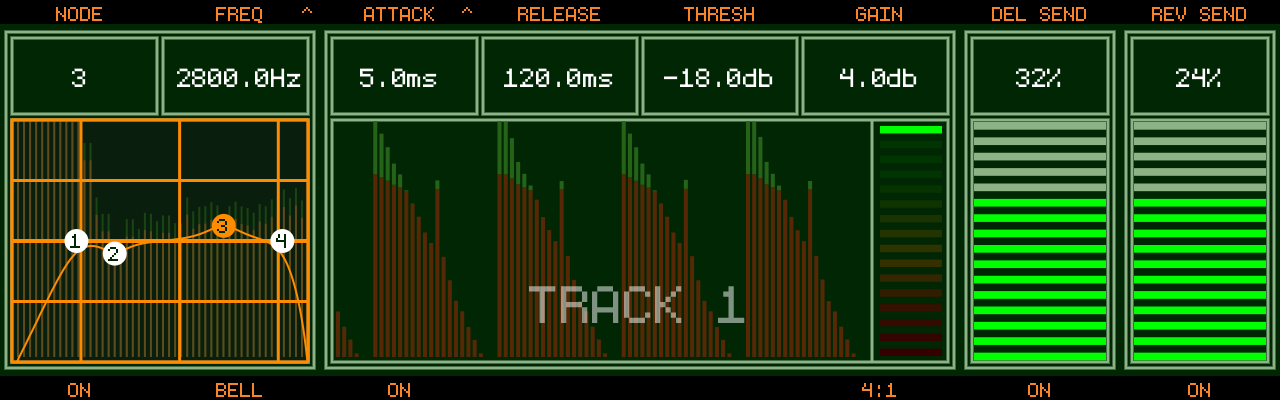
- Access via
- The edited track is clearly labeled TRACK n at the top (since v1.1.3)
Track Button→ quick-select another track- Hold
Track Button→ Solo / Un-solo that track, exactly asAUDIO+Track Buttondoes on the Audio Overview: press again to un-solo, another track moves the solo, mutes are ignored. Since the key is held, the page only changes when you let go without having pressed a Track Button (since v1.2.4-SNAPSHOT) - While
3 SOLO,2 MUTEDor just the number — so you can see at once why an edit makes no difference (the track is muted, or another track is soloed) without leaving the screen (since v1.2.4-SNAPSHOT)
Filter
- 4-node filter, per node choose a type with
Track Button 2:- Low Pass / High Pass / Band Pass / Notch / Low Shelf / High Shelf / Bell (Bell since v1.2.0)
Encoder 1selects a node, push toggles the node on/offEncoder 2adjusts the node parameter, push cycles FREQ → Q → GAIN (Gain only for Shelf/Bell types)Track Button 1toggles the whole filter on/off- Touch control (new in v1.2.1): tap a node on the graph to select it, drag to set frequency (horizontal) and gain (vertical, Shelf/Bell types)
Compressor
- Per-track dynamics with sidechain input
Encoder 3: Attack — push to switch to sidechain source (select another track, or off)Encoder 4: Release,Encoder 5: Threshold,Encoder 6: Makeup gainTrack Button 3: on/off,Track Button 6: cycle Ratio- Gain-reduction ladder: green on top = no gain reduction, segments extend down into red as the compressor works
Sidechain (since v1.2.4-SNAPSHOT)
With a sidechain source selected, the compressor listens to that track instead of its own:
- It hears the source as recorded (or as monitored at the input): before Mute, Solo, Fader, Pan, Track FX 2, the Return and the source’s own Filter and Compressor
- A muted source still triggers the compressor — record a kick on a spare track, mute it, and use it to duck another track
- The Fader of the source does not change how hard the compressor works; set that with Threshold
- Which track number the source has makes no difference
- Without a sidechain source the compressor listens to its own track, after the Filter
Up to v1.2.3 the compressor heard the source after its Mute and Fader, and after its Filter and Compressor if the source had a lower track number. Projects that use a sidechain can need a new Threshold.
Sends
Encoder 7: Delay Send,Encoder 8: Reverb SendTrack Button 7/Track Button 8: toggle the sends on/off- Delay/Reverb sends are true sends — the send taps a copy of the signal, the dry track level is never attenuated (since v1.2.1)
Track FX 2 — Channel, Polarity, Width, Inserts (since v1.2.4-SNAPSHOT)
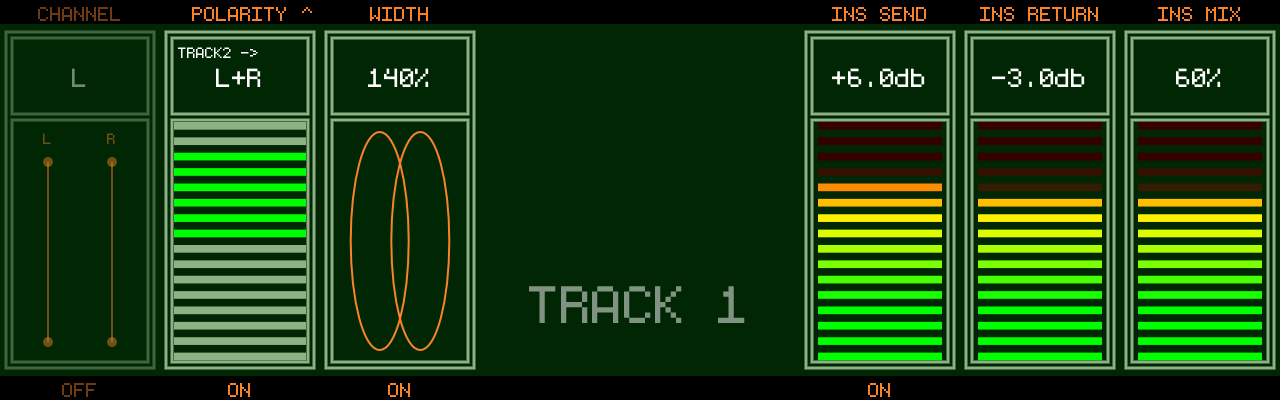
Three stereo utilities per track on the left, and the three insert faders on the right (external soundcards), on the second page of Track FX:
- Press
- The three slots run left to right in signal order: Channel picks what goes into the track, Polarity flips that, Width shapes the image of the result
- All three act before the fader and Pan, so a stereo track can be narrowed to mono and then placed with Pan
- They are non-destructive: the recording on tape is not changed. Monitored input runs through them as well, so a polarity flip is audible while you place the microphones
Track Button→ quick-select another track
Channel (Encoder 1, Track Button 1 on/off)
| Value | Left | Right | Use |
|---|---|---|---|
| off | left | right | normal stereo |
L | left | left | keep one side of a stereo recording or import |
R | right | right | the same, other side |
SWAP | right | left | cables or an import the wrong way round |
Polarity (Encoder 2, Track Button 2 on/off)
Encoder 2picks what is inverted while Polarity is on:L,RorL+RTrack Button 2is the quick comparison: flip, listen, flip backL+Ris inaudible on a track that plays alone. It matters when another track carries the same sound — two microphones on one source, a DI next to its ampLorRis audible on its own: a hollow image that loses bass and cancels in mono. Use it to repair a stereo pair with one channel wired the wrong way round- Push
Encoder 2to switch it to TRACK and pick a reference track (shown asTRACK2 ->). Push again to return to Polarity - The meter compares the track with its reference track in the low frequencies. Bars upward (green) mean the two tracks add, bars downward (yellow to red) mean they cancel. Press
Track Button 2and keep the position where the meter points up - The reference track only feeds the meter, it never changes the sound. The meter stays dark without a reference track and while either track is silent. It also works with the reference track muted or pulled down
Width (Encoder 3, Track Button 3 on/off)
- 0 % is mono, 100 % is unchanged, 200 % is the maximum width (only the difference between left and right is left)
- The two ellipses show the setting: one ellipse at 0 %, side by side at 200 %
- Width can be automated: it is the last entry of the Track FX parameter list in Audio Edit, one step to the left of the first filter parameter
- A recording of a mono input has the same signal on both sides, and so has a track with Channel set to
LorR. There is nothing to widen on those: above 100 % they only get quieter
Inserts: INS SEND, INS RETURN, INS MIX (Encoder 6, 7, 8, Track Button 6 on/off)
With an external audio interface, a track can run through outboard gear: it leaves on its insert send and comes back on its insert return (mapped on the INSERTS page of the Audio settings — see External Audio). The three faders follow the signal from left to right:
INS SEND(Encoder 6): level sent to the gear, -24 to +24 dB, 0 dB = the track as it leaves the fader. Use it to push a compressor or saturator harder than the level on tape allows, without touching the faderINS RETURN(Encoder 7): level of what comes back, -24 to +24 dB. Bring a hot device down, or a quiet one upINS MIX(Encoder 8): 0 % is the track alone, 100 % the returned signal alone, anything between is a parallel blend- Each slot has a level meter: what leaves for the gear, what comes back after
INS RETURN, and the blended result that continues into Filter and Compressor. Red on theINS SENDmeter is real clipping: that signal goes straight to the converter. If theINS MIXmeter stays steady while you turn the mix, the levels around the gear match Track Button 6switches the whole insert on / off, for a quick comparison with and without the gear. Off plays the dry track, whateverINS MIXsays; the change is a short crossfade. The send keeps running while the insert is off, so the gear stays fed and the comparison is immediate. The faders can still be set while it is off- The three slots are always on the page. A slot is dimmed when the track does not have it:
INS SENDneeds an insert send mapped,INS RETURNandINS MIXan insert return. With the internal soundcard all three are dimmed andTrack Button 6readsNO INSERT. A dimmed slot does not react to its encoder. The slots also dim while the insert is switched off INS RETURNandINS MIXcan be automated (the Return lanes in Audio Edit).INS SENDis not automated- The send is taken after the fader and Pan, so the fader still sets how hard the gear is driven;
INS SENDtrims that on top. If you use the insert sends as individual track outputs to an external mixer,INS SENDis simply the output level of the track - Up to v1.2.3 return level and mix were encoder modes of the Audio Overview (the level from -60 to 0 dB)
Good to know
- Copy / Cut / Paste on this page covers all six values of the track, so an insert setup can be copied to another track
- The individual track outputs of an external interface carry Channel, Polarity and Width as well
- EXPORT MIX and EXPORT to a track include them. Copy, Paste and Bounce work on the audio as recorded and do not; to print a polarity fix, export to a track
- A project with Width automation opens on older firmware, which drops that automation and keeps everything else
Track Sends (new in v1.2.1)
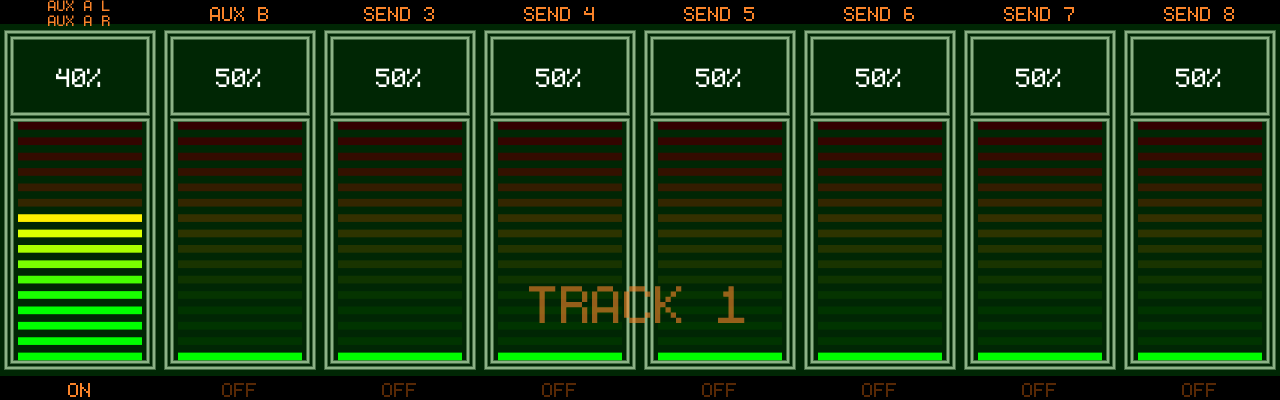
With an external audio interface, each track gets 8 additional aux sends to hardware outputs:
- Press
Encoders 1-8set the send level for sends 1-8Track Buttons 1-8toggle each send on/off;Track Buttonselects the track- Sends are true post-fader sends, summed per bus across all tracks and routed straight to the output pairs configured under
SENDSin the Audio settings — see External Audio
Important Note
- Internal processing is 32-bit float
- Red ≠ clipping (only >1.0 signal)
👉 Real clipping happens at final output
🖥 Master FX
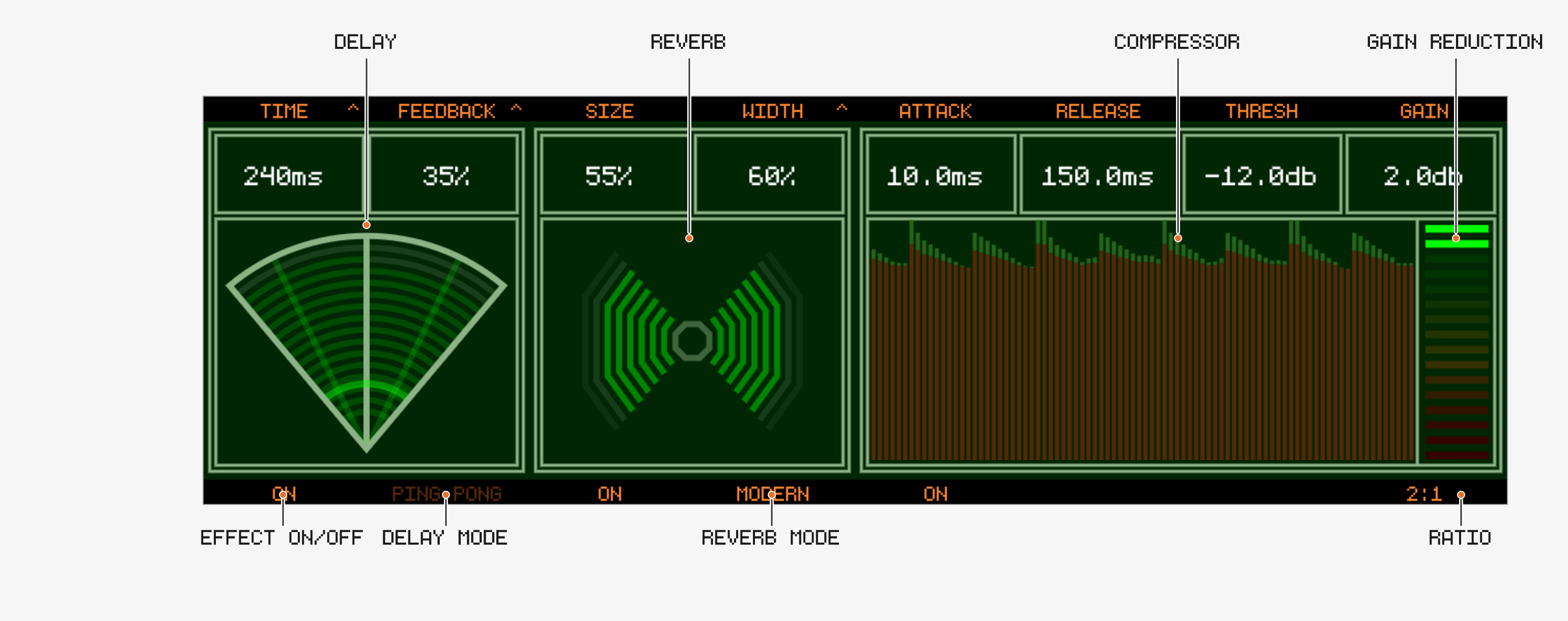
The global Delay and Reverb (fed by the track sends) plus a master bus compressor.
Delay
Encoder 1: Time — ms or beat-synced (push to toggle). Synced values are note lengths from1/1to1/64:1/4is a quarter note in every time signature (fixed in v1.2.1)Encoder 2: Feedback / Width / Mod Rate / Mod Depth (push to cycle)Track Button 1: Delay on/off — off mutes the delay return; the track sends themselves are unaffected (since v1.2.1, previously the sends passed through dry)Track Button 2: Ping-pong on/off
Delay LFO (chorus / flanger)
(since v1.2.1)
The delay time can be modulated by an LFO — this turns the delay into a chorus or flanger:
- Mod Rate (0.1–10 Hz) — LFO speed
- Mod Depth (0–20 ms) — how far the delay time swings;
0 ms= LFO off (default) - Width — with modulation active, Width also sets the L/R phase offset of the LFO:
0%= both channels move together (mono chorus),100%= 180° apart (wide stereo). When Ping-pong is on, Width additionally controls the ping-pong spread as before. Shift + Encoder 2= fine steps
Recipes: Chorus — Time 15–30 ms, Feedback 0–20 %, Mod Rate 0.3–1 Hz, Mod Depth 2–5 ms. Flanger — Time 10 ms, Feedback 50–80 %, Mod Rate 0.1–0.5 Hz, Mod Depth 1–3 ms. The radar’s time arc wobbles to indicate rate and depth.
Reverb
Encoder 3: SizeEncoder 4: Width / Damp / Pre-delay (push to cycle; a Gate page appears for the Gated algorithm)Track Button 3: Reverb on/offTrack Button 4: cycle algorithm
Algorithms
- Hall
- Ambient
- Gated
- Modern
Compressor
Encoder 5: Attack,Encoder 6: Release,Encoder 7: Threshold,Encoder 8: Makeup gainTrack Button 5: on/off,Track Button 8: cycle Ratio
🎚 Mastering Section
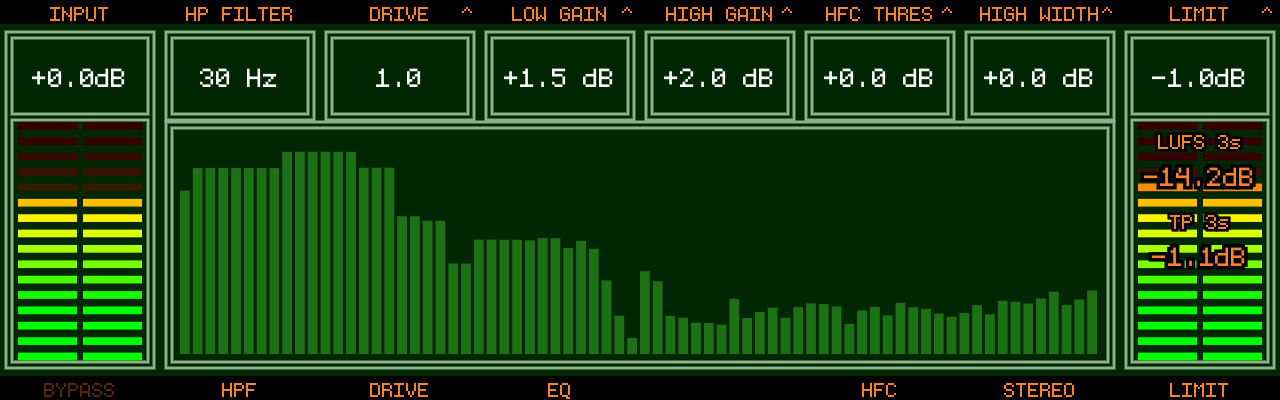
Access: press 
Chain
- Input Gain (
Encoder 1) - High-pass filter (
Encoder 2,Track Button 2) - Tape Drive — Drive + Thickness (
Encoder 3, push to cycle;Track Button 3) - Low Shelf EQ — Gain + Frequency (
Encoder 4, push to cycle) - High Shelf EQ — Gain + Frequency (
Encoder 5, push to cycle) - HF Compressor — Threshold + Crossover (
Encoder 6, push to cycle;Track Button 6) - Stereo Enhancer — Width + Space (
Encoder 7, push to cycle;Track Button 7) - Output Gain (
Encoder 8) - Brick-wall Limiter (see below)
Track Button 1bypasses the whole Mastering sectionTrack Button 4toggles the Low/High EQ
🧱 Master Limiter (since v1.1.1)
A realtime (zero latency), brick-wall limiter at the very end of the signal chain:
- Push
Encoder 8to cycle OUTPUT → LIMIT → L-RELEASE Track Button 8toggles the limiter on/off — except on the L-RELEASE page, where it toggles AUTO releaseLIMIT: set the ceiling (-12 to 0 dBFS)L-RELEASE: set the release time (5-1000 ms)- While on LIMIT/L-RELEASE the screen shows:
- LUFS 3s — loudness of the last 3 seconds
- TP 3s — True Peak (dBTP) of the last 3 seconds
📈 Spectrum Analyzer (new in v1.2.1)
The Mastering screen shows a realtime spectrum of the master output. It is fed post-limiter, so it always shows what actually leaves the device — even with Mastering bypassed.
Key Concept
- This is your final shaping stage
- Equivalent to a mastering chain — use the limiter as a safety ceiling and the LUFS/True Peak readout to judge your final level