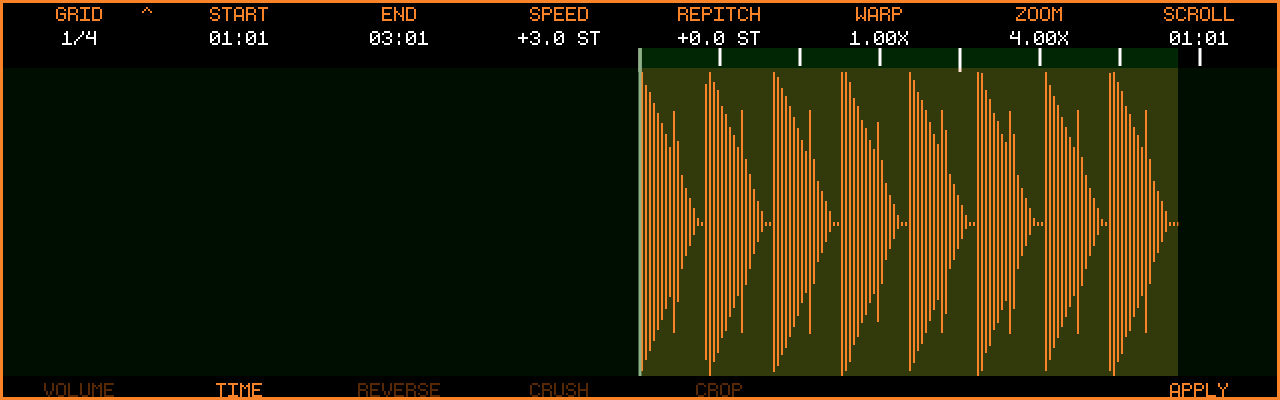
The Clipboard Modifier (introduced in v1.1.3) is a small self-contained editor that works on the audio clipboard instead of the tape. Copy audio, mangle it, audition it, then paste the result — the tape stays untouched until you paste.
The screen is marked with an orange border so it can’t be confused with the regular Audio Edit view.
Enter by touching the clipboard indicator on the Audio Overview or Audio Edit screen after a Cut/Copy
Not available for a long file imported from the stick (LONG IMPORT - NO MODIFIER, (since v1.2.4-SNAPSHOT)): such a clipboard refers to the file instead of holding the audio — paste it and edit on the tape
Or from Audio Edit: Track Button 6 CLIPMOD opens the modifier; + Track Button 6 COPY > CLIP copies the current selection and opens the modifier in one step (since v1.1.5)
Multi-track clipboards open with all copied tracks included — every edit is applied to all of them
Exit via any view button (e.g. or )
The modifier remembers the page and group you last worked in and reopens there (new in v1.2.1, pages (since v1.2.2)); all parameters start neutral on each visit
It also remembers the encoder 1 resolution — the GRID division, or JUMP mode and its millisecond step — so switching to the overview or wave edit screen and back no longer resets it to 1/4 (new in v1.2.1)
Important
Clipboard edits have no undo. If you don’t like a result, Copy the audio again for a fresh clipboard.
GRID — step size for Start/End/Scroll. Push to toggle JUMP mode (free millisecond steps instead of the musical grid). The groups’ rate and time encoders follow it, see Free rates and times
2
START of the edit region — push to set Start to the playhead
3
END of the edit region — push to set End to the playhead
4–6
Parameters of the selected group (see below)
7
Zoom (0.25x → 2048x)
8
Scroll / move the playhead
All edits apply to the region between START and END — by default the whole clipboard. Hold while turning a parameter encoder for fine steps.
Every group encoder that holds a note value — GRAINSIZE / RATE, the RATE of the four MOD LFOs and of CHORUS / FLANGE / PHASER, DELAY / PINGPONGTIME, STRETCHWINDOW, FREEZELENGTH and BLURTIME — follows Encoder 1:
On the GRID it steps through the note values, now from 1/64 up to four whole notes (4/1), so a slow sweep is reachable without leaving the tempo
Push Encoder 1 into JUMP mode and the same encoders become free of the tempo: a rate reads in Hz (0.05Hz–20.0Hz, a 20 s sweep at the slow end — the chorus at a tenth of a hertz the VOICE effects wanted), a time in ms (1.00ms–20.00s). They step in thirds of an octave like the FILTER cutoffs, a twelfth with . The engines keep their own limits (a delay of at most 2 s, a blur of about a second)
The push itself changes nothing you hear: the first click converts the value. In JUMP mode a note value turns into its time at the session tempo and steps on from there; back on the GRID a free value snaps to the next note value in the direction you turn
A free value stays as it is when the tempo changes, a note value follows the tempo. Until it is turned on the GRID again, a free value keeps showing its Hz or ms, whichever mode Encoder 1 is in, so you can see it is not synced
Hold and the first three encoders become the tuning settings that the SPRAY, RESO, TUNE, TUNED, COMB and HARMONY groups read. They are settings, not edits: they persist like GRID, have no APPLY, and turning them never discards a group’s un-applied changes. The pushes keep their normal jobs.
1–4 octaves above ROOT (RESO band range, SPRAY transposition range)
3
ROOT
C1–C6, the key of the RESO bank, TUNE, the TUNED sieve and the COMB note (SPRAY and HARMONY transpose relative to the material’s own pitch and ignore it)
The groups are organised in pages (since v1.2.2). + Track Button 1–7 selects a page, Track Buttons 1–7 select a group on the current page, and Track Button 8 stays APPLY. While is held the track-button row shows the page names (the current page lit, the others muted, undefined pages blank); release it and the row shows the current page’s groups again. The current page is always shown at the top left of the waveform area, below GRID, as [EDIT], [GRAIN], [MOD] or [FX].
Each group puts its parameters on Encoders 4/5/6. Switching page or group (or re-pressing the current group) discards any un-applied settings of the current group.
+ Button
Page
Contents
1
EDIT
the original modifier: VOLUME … FILTER (CRUSH moved to DIST), plus TUNE
2
GRAIN
rhythmic granular resynthesis and a tuned resonator
3
MOD
LFOs printed over the region
4
FX
printed delay / reverb, loop tools
5
DIST
crush, colour, tape, amp, wavefolder, ring modulator
PAN: a balance on the clip’s existing stereo pair — panning right attenuates the left channel and leaves the right untouched (and vice versa). A clip recorded into one input only lives on one side, so panning it towards the silent side fades it out rather than moving it across.
FADE: negative values = fade-in, positive = fade-out. Values up to ±100 use an equal-power curve; beyond ±100 the curve gets steeper, up to ±200 (since v1.2.0)
SHUFFLE / STUTTER (since v1.2.2): while un-applied, the divisions are drawn over the waveform — thin lines with the source slice number for each SHUFFLE slice, dashed lines at each STUTTER repeat. Lines that would sit closer than a few pixels are left out; zoom in to see them
SPEED / WARP respect the 12-minute clipboard limit across all copied tracks combined — the encoder simply stops at the last value that still fits (new in v1.2.1)
Automation copied along with the clip follows a length change: after an APPLY that resizes the clip (SPEED, WARP, CROP), pasting places the automation over the new length rather than the original one
CROP needs no parameters: set START/END (or SLIDE the region), then APPLY to discard everything outside it (since v1.2.0)
PITCH bends the pitch smoothly from FROM at the region’s Start to TO at its End without changing the length (the same engine as REPITCH). A bend that resolves to the original pitch is TO = 0; one that drifts away is FROM = 0; FROM = TO is a static repitch. CURVE shapes the ramp: LIN is a straight line, positive values start slow and finish fast, negative values start fast and finish slow. Hold for 0.1 st steps
FILTER runs one filter node over the region and sweeps its cutoff from START to END (interpolated in octaves, so a sweep sounds even across the spectrum). START = END gives a static filter. The cutoff encoders step in thirds of an octave ( = a twelfth); push Encoder 6 to cycle the type LP → HP → BP. A low-pass with both ends at 20 kHz, or a high-pass with both at 20 Hz, is “open” and does nothing; cycling the type moves any open cutoff to the new type’s open end (1 kHz for BP, which has no open position)
A static setting in one press: pushing FROM / START copies the other end’s value onto it, pushing TO / END does the reverse — so dial a sweep, then push the end you want to keep and the whole region gets that value
While a PITCH or FILTER setting is un-applied, the sweep is traced as a line over the waveform (0 st on the centre line for PITCH; 20 Hz at the bottom to 20 kHz at the top for FILTER)
On a multi-track clipboard, APPLY shows its progress per track (“Track 3/8”) (new in v1.2.1)
TUNE is pitch correction: the region’s pitch is tracked and pulled to the nearest note of SCALE / ROOT (CHROMA for a plain chromatic tuner). AMOUNT is how much of the distance is corrected, SPEED how fast the correction follows a new note — 0 snaps hard (the robotic effect), 200 ms glides and keeps vibrato. RANGE tells the tracker what to expect: BASS (30–300 Hz), VOICE (70–1000 Hz) or HIGH (200–3000 Hz). While un-applied the tracked pitch is drawn over the region in the waveform colour and the corrected pitch in the accent colour, ±12 semitones around the material’s median note; silence and noise leave gaps and are left alone. TUNE is monophonic: chords and mixes have no single pitch to track and come out mangled. Large corrections move the formants with the pitch (chipmunk on octave jumps); within a semitone this is inaudible. Rendered in the background like the SPECTR groups, so [RENDER] shows while it computes
Rhythmic granular resynthesis: the region is re-read as a stream of short grains on the musical grid.
Button
Group
Encoder 4
Encoder 5
Encoder 6
1
GRAIN
SIZE (grain length, note value 4/1–1/64, or ms in JUMP mode)
RATE (grain onset interval, note value, or Hz in JUMP mode)
CONTOUR (-100 ramp down · SINE · +100 ramp up), push to toggle FOLLOW / HOLD
2
SPRAY (grains follow GRID)
POSITION (0–100 %, read-position scatter), push to re-roll
PITCH (0–100 %, chance of a scale-degree transposition)
REVERSE (0–100 %, chance of a backwards grain)
3
RESO
SLOPE (LP -100 · BP · HP +100)
DECAY (0–100, ring time)
MIX (0–100 %) — the wet is level-matched to the dry (since v1.2.3)
Notes:
GRAIN and SPRAY have no neutral setting, so you hear them as soon as the group is selected (since v1.2.4-SNAPSHOT; before, they stayed silent until the first encoder turn — the same now holds for FREEZE, BLUR, PEAKS and CONVOLVE, whose encoders show a working setting from the start). Re-pressing the group button puts the defaults back. WRITE BACK treats such a group as untouched until you turn one of its encoders. With RATE shorter than SIZE the grains overlap into a dense texture, with RATE longer than SIZE they gate the region rhythmically. FOLLOW reads each grain where it sounds, so the arrangement is kept but re-articulated; HOLD reads every grain from the region start, freezing that instant into a sustained texture
SPRAY runs the same scheduler with grains one GRID step long, back to back (or one JUMP step in JUMP mode), and adds randomness per grain; change GRID on Encoder 1 to change the grain size. Transpositions are drawn from the SCALE / SPAN tuning settings, relative to the grain’s own pitch. The random pattern is fixed by a seed, so what you audition is what APPLY prints; push Encoder 4 for a new roll
While GRAIN or SPRAY is un-applied the grains are drawn over the waveform as window-shaped outlines on a dark backing, so they read over a waveform of the same colour: their width is SIZE, their spacing RATE, their shape CONTOUR. A transposed grain sits higher or lower (0 st on the centre line, like the PITCH line), a reversed grain shows its contour mirrored, and when a grain reads from somewhere other than where it sounds (POSITION, HOLD) a thin line leads to its read position at the bottom of the waveform
RESO is a bank of resonant filters tuned to the notes of SCALE across SPAN octaves above ROOT (at most 24 bands). The root sits in the centre and the following bands alternate left and right, so a chord spreads across the stereo field; the wet signal is lifted with DECAY and soft-clipped, so a narrow, long-ringing band comes out loud rather than thin. While un-applied the bank’s frequency response is drawn as a graph in a dark strip along the bottom of the waveform: one peak per band on a log frequency axis that spans the bank with an octave to spare on each side, DECAY narrowing the peaks, SLOPE growing a shelf on the side each band lets through, the root band’s note name under its peak (every band’s while there are few). The graph sits over the region while the region is wide enough, else across the whole screen. Fed a drum loop it produces a pitched, plucked version of the groove; fed a pad it rings as a chord. SLOPE morphs every band from low-pass through band-pass to high-pass, DECAY sets how long the bands ring. The ring-out continues past END into the rest of the clip (up to 6 s) and is cut at the clip end
One LFO per group, printed over the region. All four share the same encoder layout.
Button
Group
Encoder 4
Encoder 5
Encoder 6
1
VOL LFO (tremolo)
RATE (note value 4/1–1/64, or Hz in JUMP mode)
DEPTH (0–100 %)
SHAPE (SINE, TRI, SAW DN, SAW UP, SQUARE, S&H), push to advance the phase by 90°
2
PAN LFO (auto-pan)
RATE
DEPTH
SHAPE
3
PITCH LFO (vibrato, ±12 st at 100 %)
RATE
DEPTH
SHAPE
4
FILT LFO (auto-wah)
RATE
DEPTH (-100 to 100 %): positive closes a low-pass from 20 kHz by up to 8 octaves, negative opens a high-pass from 20 Hz by up to 8 octaves
SHAPE
Notes:
DEPTH 0 is neutral. Every shape starts unmodulated at the region’s Start: on VOL LFO and FILT LFO the wave dips from the top (SAW UP is the one swell that starts at the bottom); on PAN LFO and PITCH LFO it starts at the centre, SINE / TRI / SAW UP moving right / up first and SAW DN left / down first (SQUARE and S&H have no centre to start from and begin at the top). Pushing SHAPE advances the phase by 90°, so on PAN / PITCH one push starts at the peak, two at the centre falling, three at the trough. While a setting is un-applied the LFO is traced over the waveform at its actual DEPTH: VOL LFO as the gain from the top, PAN LFO and PITCH LFO around the centre line, FILT LFO as the cutoff on the filter scale (low-pass dipping from the top, high-pass rising from the bottom)
FILT LFO shows LP or HP in front of its DEPTH value so the sign is readable at a glance
A SQUARE on VOL LFO at 1/8 is a trance gate, a SAW DN at 1/4 a pump, S&H on PITCH LFO a random pitch pattern
SOURCE (a track of the clipboard, or a WAV from the USB stick; push opens the USB browser)
END · START (push to switch; the impulse span, 10 ms–5 s)
MIX (0–100 %, 50 to start) · TILT (-100–100, push to switch)
Notes:
REVERB is the Master FX reverb with the same four programs — MODERN (the dense plate the group started with), HALL, AMBIENCE and GATED — and the same parameters: SIZE, DAMP, WIDTH, PREDEL and, for GATED, GATE. The ^ in the encoder’s corner marks the pushes, as elsewhere on the screen (SIZE cycles the program, Encoder 5 cycles its parameter).
DELAY / PINGPONG / REVERB are printed into the clip: inside the region MIX crossfades the dry signal with the effect, and the tail keeps running past END on top of the rest of the clip (up to 6 s, cut at the clip end). A printed tail can be reversed, granulated or resonated afterwards. The delay time is capped at 2 s
While un-applied, DELAY / PINGPONG mark each repeat above the waveform (fading with FEEDBACK; PINGPONG alternates top and bottom for left and right) and REVERB draws its decay envelope over the region: as tall as MIX at START, falling away over the tail’s length
CONVOLVE switches Encoder 1 to JUMP mode (millisecond steps) when you select it and puts the previous mode back when you select another group — an impulse span has nothing to do with bars. Push Encoder 1 to get the GRID back while in the group (since v1.2.4-SNAPSHOT)
CONVOLVE uses one track of the clipboard as an impulse response for all the others: copy several tracks (a drum hit, a chord, a room on one of them), choose that track with SOURCE, and every other track in the clipboard is convolved with the part of it between START and END — a snare through a piano chord, a voice through a reversed cymbal, a guitar through a recorded room. The span starts at the region’s START and is one second long until you move it: Encoder 5 moves END by grid steps (or JUMP steps), its push switches the encoder to START, which carries the whole span along; the span is at most 5 s. MIX blends each result with that track’s own dry signal (50 % to start), and the push of Encoder 6 switches the encoder to TILT, which darkens (negative) or brightens (positive) the impulse. While CONVOLVE is the selected group the source track is never part of the audition, whatever MIX says, so you hear only the convolved tracks; APPLY leaves the source track as it is. With a single track in the clipboard there is nothing to convolve: the group says so on the waveform and SOURCE shows 1 TRACK. Each convolved track is level-matched to its own dry signal — measured once the impulse has fully built up — so a long, dense or tonal impulse does not jump in volume even at MIX 100 %. CONVOLVE is rendered in the background like LOOP and the SPECTR groups; like them it stops at the region’s END (set END past the material to keep the tail). While un-applied, dashed lines mark the impulse span on the waveform with the impulse’s own outline between them, as tall as MIX at its loudest point, and the source track is drawn dimmed with a SRC tag at its left edge (since v1.2.4-SNAPSHOT; before, a generic decay curve stood in for the impulse)
The impulse can also be a WAV file from the USB stick (since v1.2.4-SNAPSHOT): push Encoder 4 (SOURCE) and the USB Browser opens in impulse mode — browse and preview as usual, then press Copy on a WAV or AIFF file and you are back in the modifier with that file’s first 5 s as the impulse (SOURCE shows its name; Track 1 at the root of the stick goes back without a file). With a file as the impulse every track of the clipboard is convolved, so a single copied track works too — a guitar through a real room recording, a drum loop through a sampled spring. START / END then move inside the file — the whole file is the impulse to start with, and since END sits at the file’s end, START moves alone and trims the impulse from the front (the same holds for a track whose END is at the clip’s end; elsewhere START carries the span along as usual). The outline is drawn from the region’s START. Every file you load this way stays in SOURCE’s ring below the clipboard’s tracks for as long as the modifier is open, newest first and up to eight (loading a ninth drops the oldest), so you can A/B impulses by turning SOURCE: down past the first track reaches the file you loaded last, further down the earlier ones, and each file keeps its own START / END. Loading a file that is already in the ring moves it to the front instead of adding it twice. With several files the SOURCE value shows the position after the name (ROOM 2/3). Leaving the modifier forgets the files. The file is read at any sample rate and converted; longer files are simply cut after 5 s.
ROTATE turns the region cyclically by grid steps (or JUMP steps in JUMP mode) so another beat lands on its start. XFADE smooths the loop seam: it blends the audio that follows END into the region’s start (or, when END is the clip end, the audio before START into the region’s end; with neither available it fades both ends). LAYER stacks the region onto itself every grid step, wrapping around the region, with a decaying level — a circular canon. LOOP is rendered in the background like the SPECTR groups ([RENDER] shows while it computes, the audition and the waveform switch to the result when it is ready; since v1.2.4-SNAPSHOT). The waveform then shows the result of all three tools (turned, seamed and stacked, exactly as APPLY will print it); a dashed line marks the ROTATE seam, XFADE draws its crossfade curves over the seam span, and LAYER marks each tap with a fading marker
Everything that bends the waveform itself. CRUSH (from the EDIT page) and COLOR (from the FX page) live here now.
Button
Group
Encoder 4
Encoder 5
Encoder 6
1
CRUSH
BIT (32 down to 1 bit, relative to the clip’s own peak level)
SAMPLE (1x–32x rate reduction)
—
2
COLOR
DRIVE (0–100, tape saturation)
TILT (-100 drive the lows … +100 drive the highs)
COMP (0–100, one-knob compression), push to cycle the TILT crossover LOW (80 Hz) / MID (650 Hz) / HIGH (2.5 kHz)
3
TAPE
DRIVE (0–100)
DENSITY (0–100)
MIX (0–100 %)
4
AMP
GAIN (0–100, up to +30 dB), push to cycle the model CLEAN / CRUNCH / FUZZ / METAL
TONE (-100 dark … +100 bright)
CAB (0–100, speaker low-pass)
5
FOLD
FOLD (0–100)
SYMMETRY (-100 … +100)
SMOOTH (0 triangle … 100 sine)
6
RING
FREQ (20 Hz–2 kHz)
MIX (0–100 %)
WAVE (SINE / SQUARE / TRI)
Notes:
CRUSH’s BIT grid spans the clip’s own peak level, not full scale (since v1.2.4-SNAPSHOT): at 1 bit the loud half of the clip becomes full-height blocks and the quiet half silence, whatever level the clip was recorded at; before, anything under -6 dBFS vanished at 1 bit and a quiet clip crushed to nothing. Each track in the clipboard is crushed against its own peak. SAMPLE holds the crushed value, so the audition is exactly what APPLY prints
TAPE is the mastering tape saturator from the Master FX, printed into the clip, but let off the leash: DRIVE also pushes up to 12 dB of extra gain into the tape and above 50 blends in a second saturation pass, so DRIVE 100 is a fuzz rather than a polish. DENSITY is the tape’s thickness control, MIX blends the saturated signal with the dry one
AMP is a small amp chain: TONE shapes the sound before the stages (negative closes a low-pass, positive lifts the presence), GAIN drives the stages, CAB closes a 12 dB/octave speaker low-pass from fully open to 2.5 kHz. CLEAN is one soft stage, CRUNCH two asymmetric stages with a coupling filter between them, FUZZ a biased hard clip into a soft stage, METAL a tight high-pass into two hard stages with the mids scooped
FOLD is a wavefolder: FOLD drives the signal into the folder (up to 16x), SYMMETRY offsets it so even harmonics appear, SMOOTH morphs the folds from triangle (buzzy) to sine (round)
AMP and FOLD hold the level: their output is matched to the input’s envelope, so GAIN and FOLD add harmonics rather than volume and the result pastes back onto the tape at the level it was copied
RING multiplies the region with a carrier at FREQ: low carriers tremble, higher ones produce the metallic sidebands ring modulation is known for. FREQ steps in thirds of an octave ( = a twelfth). The carrier is locked to the region’s Start, so audition and APPLY sound the same
While a TAPE, AMP, FOLD or RING setting is un-applied the waveform shows the distorted result; after a change it fills in from the playhead outward over a fraction of a second (since v1.2.4-SNAPSHOT)
Everything on this page works on the spectrum of the region, frame by frame, and is the experimental end of the modifier. It is where sounds are turned into textures.
Button
Group
Encoder 4
Encoder 5
Encoder 6
1
STRETCH
FACTOR (1x–64x)
WINDOW (note value 4/1–1/64, or ms in JUMP mode)
ORIGIN (0–100 %), push to take the playhead
2
FREEZE
POINT (0–100 %), push to take the playhead
LENGTH (note value 1/64–4/1, or ms in JUMP mode; one step further down = TO END)
BLUR (0–100)
3
BLUR
TIME (note value, or ms in JUMP mode)
FREQ (0–100)
MIX (0–100 %)
4
GATE
THRESH (-60–0 dB), push to cycle KEEP / RESIDUE
SMOOTH (0–100)
MIX (0–100 %)
5
TUNED
WIDTH (5–50 cents, steps of 2)
DEPTH (0–100 %)
MIX (0–100 %)
6
SHIFT
SHIFT (-2000–+2000 Hz)
MIX (0–100 %)
FEEDBK (0–90)
7
PEAKS
PEAKS (1–64)
DECAY (0–100)
MIX (0–100 %)
Notes:
STRETCH is a Paulstretch in place: the region is stretched by FACTOR and cut back to its own length, so it ends up holding the first 1/FACTOR of the source, smeared into a texture. ORIGIN chooses where in the region that source starts (it wraps around the region), WINDOW sets the grain: short windows keep some rhythm and sound grainy, long ones are smooth and cloud-like. FACTOR 1 = off
FREEZE holds the instant at POINT for LENGTH — a spectral freeze. LENGTH steps through the note values like GRID (turn up for shorter), or free milliseconds in JUMP mode; one step down past the longest value is TO END, which holds the instant to the end of the region. BLUR 0 loops that instant as it is (a static, buzzing hold), 100 randomises the phases into a smooth cloud. The material before POINT, and after the held length, stays as it was, with a short crossfade at both ends
BLUR smears the spectrum: TIME averages each moment with its neighbours (up to about a second each way), so attacks turn into swells and notes bleed into each other; FREQ smears across frequency, blurring pitch into noise. What is silent stays silent
GATE is a spectral gate: every frequency bin below THRESH (0 dB = a full-scale sine) is removed, so KEEP cleans a sound down to its loud partials. RESIDUE keeps exactly what KEEP throws away — the quiet ghost of a sound, the breath under a voice. SMOOTH slows how fast each bin opens and closes
TUNED is a scale sieve: it keeps only the frequencies within WIDTH cents of a note of SCALE / ROOT (in every octave), eases out over another WIDTH, and attenuates everything else by DEPTH — so narrow widths leave thin, pure tones and 50 lets the sieve just touch the neighbouring notes. Unlike RESO it adds no ringing — it is RESO’s transparent sibling, and tunes noise and drums to a key
SHIFT is a frequency shifter (not a pitch shifter): every partial moves by the same number of Hz, so harmonic sounds turn into bells and metal, and a few Hz make a slow, phasing detune. The encoder steps finer near zero. FEEDBK re-shifts the delayed output, the barber-pole effect
PEAKS keeps only the PEAKS loudest partials of every instant and removes the rest — a sinusoidal reduction that turns anything into a thin, pure, slightly ghostly version of itself. DECAY lets a partial that just dropped out ring on
Note
The SPECTR groups (and HARMONY on the VOICE page, TUNE, and LOOP and CONVOLVE on the FX page) are rendered, not played live: about a tenth of a second after you stop turning an encoder the region is rendered in the background, in one-second pieces starting at the playhead and running ahead of it (since v1.2.4-SNAPSHOT; before, the whole region was rendered first). [RENDER] shows top right while the piece under the playhead is still computing. The audition fades from the previous result (or the dry clip) to the new one as soon as that piece is ready, so a long region answers as fast as a short one, and a jump of the playhead renders from the new place. The waveform shows the rendered result where a piece has been rendered and the dry clip elsewhere; while the audition stands still, the part on screen fills in. APPLY uses exactly the same rendering, so what you auditioned is what is printed. The audio never stutters because of a render: where no piece is ready yet the dry clip plays.
Everything that adds or reshapes copies of the voice.
Button
Group
Encoder 4
Encoder 5
Encoder 6
1
CHORUS
RATE (note value, or Hz in JUMP mode)
DEPTH (0–100)
MIX (0–100 %), push to cycle 2 / 3 / 4 voices
2
FLANGE
RATE
DEPTH (0–100)
FEEDBK (-95–+95)
3
PHASER
RATE
DEPTH (0–100), push to cycle 4 / 8 / 12 stages
FEEDBK (-95–+95)
4
COMB
NOTE (scale degrees from ROOT, -24–+24)
FEEDBK (-95–+95)
MIX (0–100 %)
5
FORMANT
SHIFT (±12 st)
MIX (0–100 %)
—
6
HARMONY
INTERVAL (-7–+7 scale degrees)
DETUNE (±50 cents)
MIX (0–100 %)
7
WIDTH
SPREAD (0–100)
DELAY (0–30 ms)
—
Notes:
CHORUS, FLANGE and PHASER sweep with a tempo-synced RATE like the MOD page LFOs, locked to START, so the audition and APPLY sound the same; in JUMP mode the RATE is a free Hz value down to 0.05Hz, the slow drift a chorus or phaser usually wants (see Free rates and times). CHORUS stacks two to four detuned copies around 20 ms; FLANGE sweeps one short tap (0.5–7.5 ms) with feedback, PHASER sweeps a cascade of allpass stages over four octaves. Negative FEEDBK inverts the feedback for a hollower tone. While un-applied the sweep is traced over the region, as tall as DEPTH
COMB is a feedback comb tuned to a note of SCALE / ROOT (NOTE counts scale degrees, the resulting note is shown): it rings the region at that pitch’s harmonics. Negative FEEDBK puts the peaks on the odd harmonics of the note an octave down. The wet signal is held at the input’s level, like AMP / FOLD / RESO, so FEEDBK adds resonance rather than volume. The comb rings out past END
FORMANT shifts the formants — the resonances that give a voice or instrument its character — without changing the pitch: up for a smaller, brighter body, down for a larger, darker one. Rendered like the SPECTR groups
HARMONY layers a pitch-shifted copy at INTERVAL scale degrees above or below (SCALE decides what a degree is; ROOT is ignored, the interval is relative to the material) with DETUNE in cents; MIX is the level of the added voice. Rendered like the SPECTR groups
WIDTH spreads the stereo image: SPREAD widens the side signal (up to 3x) and, so that a mono take widens too, blends a short delayed copy of the mid in as side (pseudo-stereo, which colours the tone a little); DELAY delays the right channel by a few milliseconds (a Haas delay). Turning either while the audition runs glides to the new setting instead of jumping
plays the clipboard (not the tape), including all pending, un-applied settings — tweak while it plays
jumps the playhead to START without toggling playback (a running audition restarts from there). Pressed again while the playhead sits on START — or has just restarted from it — it jumps to the start of the clip, so two presses review the whole clip after editing a section (since v1.2.2)
/ move the playhead by the GRID / JUMP step
toggles looped playback
/ set the loop points to the playhead
Press + together to snap the loop to the current START/END region (new in v1.2.1)
Looped audition dips briefly (about 5 ms each side) through the loop point so the wrap never clicks; this is audition only — APPLY and the paste use the region exactly as it is (since v1.2.2)
Tape playback is silenced while the modifier is open; it resumes when you leave the screen