MIDI Device Profiles
(since v1.2.1)
A device profile tells Track8 what an external MIDI device understands: which notes trigger which drum sound, and which CCs it listens to. Bind a profile to a MIDI channel and every track sent to that channel gets:
- a profile piano roll in MIDI Edit — one labelled row per named note
(
Kick,Snare,HH Close…) instead of the chromatic piano, rows expanded to fill the screen when only a few notes are configured - a CC selector that lists the device’s controllers, in the profile’s order and with the profile’s names
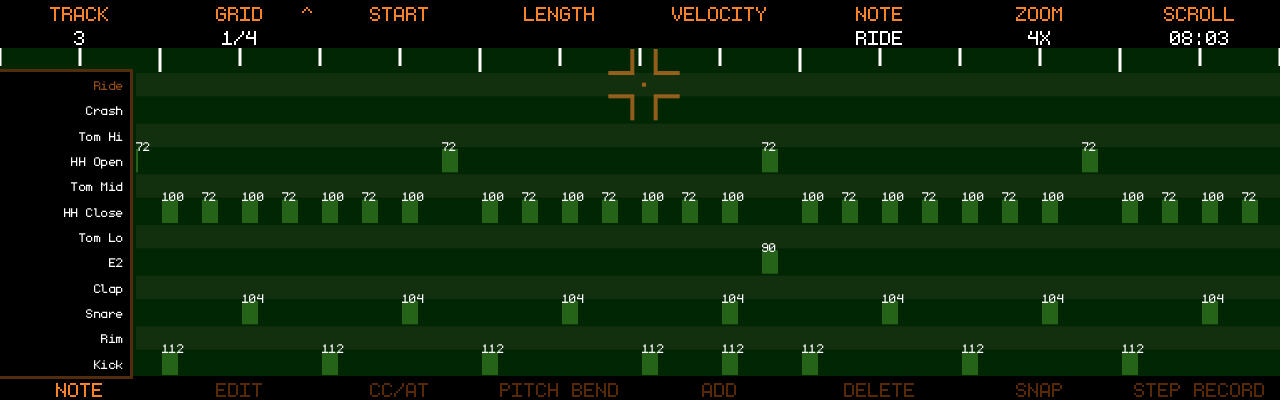
Profiles are bound per MIDI channel, globally — a synth on channel 5 is
the same synth in every project. Binding lives in UTILITY → MIDI →
CH NAMES, next to the channel names.
Binding a profile to a channel
UTILITY → MIDI → CH NAMES:
- Encoder 1 highlights a channel row
- Encoder 8 cycles the profile for that channel:
---(none) and every profile file found on the SSD; push clears the binding - A bound channel shows the profile’s name (in the automation colour); a custom channel name (touch the row) still wins for display
The folder is rescanned every time you open CH NAMES, so a file you just
copied over USB shows up immediately.
Profile files
Profiles are JSON files in midi_profiles/ on the Track8 SSD (next to
projects/). Edit them on a computer in USB-disk mode. On first start
Track8 creates the folder with a few examples to copy from: GM Drums,
TR-909, TR-808, Generic Synth.
{
  "version": 1,
  "name": "Tempest",
  "notes": {
    "36": "Kick",
    "38": "Snare",
    "42": "HH Close",
    "46": "HH Open"
  },
  "controllers": [
    { "cc": 74, "name": "Cutoff" },
    { "cc": 71, "name": "Reso" },
    { "cc": 1,  "name": "Mod" }
  ]
}
name— shown on the device (max 16 characters). Empty → the file name.notes— note number (0–127) → label (max 10 characters). Only these notes get a row in the profile piano roll. Leave empty for a melodic device.controllers— the CC list of the Named selector, in this order, with these names (max 10 characters). Leave empty to keep the standard list.- The file name (without
.json) is what the channel binding remembers — rename the file and the binding showsname ?until you re-bind it. - A file that does not parse is ignored (and logged); it never breaks the others.
In MIDI Edit
Note view (profile with notes):
- The piano keys on the left are replaced by the note names; rows that are
not in the profile but carry data on this track still get a row, labelled
with the note name (
E2), so nothing becomes unreachable. Encoder 6(note cursor) steps from row to row; moving or adding a note works the same way — a note can only sit on a row.- Up to 15 rows (named notes plus any notes with data) → rows grow (up to 3× the chromatic row) and the block is centred; with more rows the labels would become unreadable, so the rows keep their readable height and scroll around the cursor instead (like the chromatic piano).
SHIFT+ pushEncoder 7(zoom) toggles back to the chromatic piano (and back again) for the session — e.g. to play a melodic part on a drum channel.SNAPhelpers (TRKR / HARM) are off while the profile rows are shown.
CC/AT view (profile with controllers):
- Named CCs = the profile’s list; Free CCs = every other CC, so a CC the profile hides is still reachable there.